Showing posts with label photo tips. Show all posts

Sunday, June 19, 2016

My etsy photo checklist

We talk a lot in shop critiques about the need to use all five photos, which gets people asking the question about what to use those precious slots FOR. Well I can think of all kinds of ideas that need to be conveyed in your photos! Remember - if a customer was standing by your item in a store, they'd get to feel it in their hand, flip it over, open it - they can't do that online. You are trying to replace that. It's a serious challenge!

So with the help of our contestants from Bamboo day at Etsycontest, here is an easy checklist of things you need to show in your five photos.

1) The whole item in one shot, with white space around it so it fits in a thumbnail and I can see it without scrolling. This is ESPECIALLY important if it's a long necklace or a candlestick or something vertical - don't make me scroll to see the item, pull the camera back.
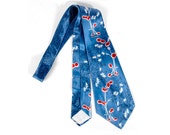
Vintage 40s Tie - 40s Necktie - 40s Cravat - Wide Satin Tie - Swing Tie - Novelty Print - Asian Tie - Bamboo - Red White Blue - Van Heusen36th place June 16th, 2016
Theme Thursday! Bamboo items from $1-$50.

Vintage 40s Tie - 40s Necktie - 40s Cravat - Wide Satin Tie - Swing Tie - Novelty Print - Asian Tie - Bamboo - Red White Blue - Van Heusen
by royalstarvintage


2) Closeup of details
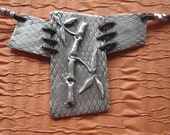
Fine Silver Bamboo Pendant60th place June 16th, 2016
Theme Thursday! Bamboo items from $1-$50.

Fine Silver Bamboo Pendant
by MWTArtJewelryDesigns


3) "Sense of scale" photo - in its natural, usable setting, next to known objects, so I know how big it is. I have a whole blog post just about sense of scale photos - they're the most important, in many ways!
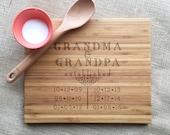
Personalized Cutting Board, Grandma & Grandpa, Established Dates For Grandkids, Personalized Gift For Grandparents, Bamboo Cutting Board22nd place June 16th, 2016
Theme Thursday! Bamboo items from $1-$50.

Personalized Cutting Board, Grandma & Grandpa, Established Dates For Grandkids, Personalized Gift For Grandparents, Bamboo Cutting Board
by DolceHome


4) "Concrete scale" photo - next to a ruler that has both inches and centimeters to remove all doubt about dimensions.

5) Closeup of hardware. Jewelry, for instance, how's it clasp? Framed picture - how does it hang up?
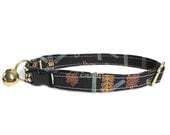
Hanging Gardens of Babylon Adjustable Cat Collar14th place June 16th, 2016
Theme Thursday! Bamboo items from $1-$50.

Hanging Gardens of Babylon Adjustable Cat Collar
by FashionableFelines


6) Other angles. If I was in a store I'd pick this thing up and look at the back, side, bottom - I can't do that online, so give me a photo!
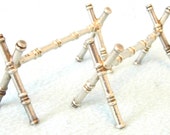
FREE POST - Antique Pair of French Silver Plated Cutlery Rests, Knife Rests, Stylish Pair, Superb Table Decor, Fine Dining, Bamboo Effect27th place June 16th, 2016
Theme Thursday! Bamboo items from $1-$50.

FREE POST - Antique Pair of French Silver Plated Cutlery Rests, Knife Rests, Stylish Pair, Superb Table Decor, Fine Dining, Bamboo Effect
by AToasttothePast


7) Photo of the item being worn, if it's an accessory. What kind of things does it go with?

Bamboo & Organic Cotton Extra Wide Headband, Bohemian Tie-Dye Featuring Blue and Purple, Wide Dreadlock Headband1st place June 16th, 2016
Theme Thursday! Bamboo items from $1-$50.

Bamboo & Organic Cotton Extra Wide Headband, Bohemian Tie-Dye Featuring Blue and Purple, Wide Dreadlock Headband
by PoseyAndChelle


8) Packaging, if gift packaging comes along with it and it's cute.
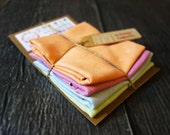
SET OF 5| Drool Cloth|+Gift Set+|12x12in|Burp Cloth|Bamboo Baby Cloth|Organic Wipe Cloth|Non-Toxic|Made in USA| Rosie's IdeaFeatured June 16th, 2016
Theme Thursday! Bamboo items from $1-$50.

SET OF 5| Drool Cloth|+Gift Set+|12x12in|Burp Cloth|Bamboo Baby Cloth|Organic Wipe Cloth|Non-Toxic|Made in USA| Rosie's Idea
by Rosiesidea


So that's 8 photos and you only have 5 spots - surely that justifies using them all! It's true, sometimes I get lazy and don't use all five, but if I'm serious about a listing? 5 it is!

Monday, October 27, 2014

DIY Light Box for Etsy Photos

Photography comes up a lot in the Etsy forums, and I find myself repeating to lots of people how easy it is to make yourself a light box setup so you don't have to wait for perfect weather to go outside and take well-lit photos. I don't know about you but I've got a day job and two crazy kids, so the only time I really get to take photos is when I'm up at 4am with my to-do list on my mind and that's not when the sunlight is, uh, anywhere.

I use cheap $30 cameras I buy off Ebay to take my photos. The camera, I've found, is not that big a deal. You can spend $3000 on a camera and your photos might be better than mine, but not 100 times better than mine, despite the staggering cost difference. What matters the most is the environment you're taking the pictures in.

So here's my setup:

It's pretty darn basic. You could use almost anything to accomplish this. My light box is made from:

1) PVC pipe, for the basic structure
2) White ripstop nylon to bounce and reflect light around inside
3) Poster board background
4) Clip on lamps
5) Full spectrum compact fluorescent light bulbs
6) Assorted props for photo time

The lamps are from a few places. First I got some clearance desk lamps at Target, but if they hadn't been clearance they might have run my budget up quite a bit. They're okay.

I experimented with several backgrounds - white curtain lining fabric, projector screens, all flavors of more expensive stuff. The cheap white posterboard turned out to be my favorite.

If I had it to do over again I would do it with just these shop lamps, which I got at Home Depot in the electrical section and I just adore. They're cheap, aluminum, and will take a bulb up to 100 W (try that with a desk lamp!) And the clips really hold them in place. Not as pretty but much more functional!


Don't laugh at the whole at the top of my nylon there... it's to stick my camera lens straight through the top and take pictures from above. Works awesome!

The one place I would not cheap out is on the light bulbs. I special ordered full-spectrum daylight compact florescent bulbs from 1000bulbs.com because they don't get as hot as incandescent. I can put a "120 W equivalent" in my "under 100 watt" lamp because when you use CFL, it only actually uses 32 watts! These light bulbs run $6-8 each but they last a long time and have a wonderful effect:


And finally, I keep my photo props handy inside my light box at all time. I wrote before about how at least one of your five photos must give your customers a sense of scale, so I have things like a ruler, cards (because I make card holders), and sometimes coins or markers around to show what the item I'm selling looks like in comparison to everyday objects.


Then it's photo time! Afterwards, I'll still retouch my photos in GIMP to get a really white background. But my light box gives me a great start!

Friday, August 10, 2012

Photo tips: Getting a white background with GIMP

My last photo tip post was about good things to use in backgrounds, and I posted that up mainly to appeal to the other side because, I hate to say it, I am a white background person. I just think my shop items stand out better on white, treasury curators tend to agree, and based on the comments on that background post I am not the only one!  I once heard a tip about job interviews that you should never wear perfume, you never know who you're going to offend or create allergy issues for, why risk the distraction?  Well, same with backgrounds.  You can't go wrong with white.

The problem is that I'm cheap. I have two digital cameras, one's a Casio that cost around $70 and the other is an older Sony Cybershot that I got off ebay for $40 because my kid broke the battery holder on the casio... long off-topic story there. But honestly, both cameras take about equally "okay" pictures.

I have a light box that I made myself from PVC pipes and clip-on lamps from Lowes that were around $6 each. The lamps have full-spectrum CFL bulbs - that was important to me, and expensive, I special ordered them from 1000 bulbs and really wanted CFLs because they don't generate as much heat (and they last an awfully long time!) I have five of these 23-watt bad boys shining in my lightbox. The inside of my lightbox is a posterboard surface and I use white ripstop nylon inside to reflect light.

After all that effort, here's what my camera churns out for my lovely little nebula zipper pouch:


It's an okay image! But clearly not white, and the colors aren't as bright as they are on the real thing. That means it's time for some post processing.

My favorite image tool EVER is the GIMP. It's free and open-source and runs on all kinds of operating systems.

First I brighten up the picture by quickly adjusting the white balance, because my cameras don't have great white balance adjustments (and who wants to spend hours messing with that anyway?) In GIMP, this is done with the menu Colors > Auto > White balance. And here's the result:


Notice how much easier it is to mess with an image on your computer, rather than on your camera?

Now that the image looks like it's "supposed" to be on a white background, I use the magic wand "Fuzzy Select" tool with threshold 50, feather edges 20 or the tool next to it (select similar colors) to select the gray-ish background and hit "delete" to make it white:


The result:


Then finally I crop the image to Etsy's 10x8 ratio so I know it'll look great in the thumbnail view and no edges will be left off (refer to the awful examples in my post about thinking in the thumbnail to catch what I'm talking about).

Wasn't that fast an easy? Thank you GIMP and the open source movement for giving us such a great tool!


Sunday, July 29, 2012

Good examples of Etsy photo backgrounds

I have to admit I'm one of those white background people. It's just the best way I've found to make sure my product gets seen, my colors are bright, and there's nothing distracting around the edges.

It's not for everybody, some people like to (or need to) have a different background, and that's okay!

Unless it's not okay! Every day I see photos that make me feel like I'm playing "where's waldo" - crowded backgrounds with strange edges, bad "frame" sort of ideas, you get the picture.

The problem is that people's eyes naturally go towards the darker, brighter, bolder colors. So you always need to ask yourself, where's the attention focused?

The worst violators I see are:
- Other not for sale stuff in the photo. It's fine for photos 2-5 but not for your primary one, people are trying to scan these too quickly.
- Artificial, photoshopped-in "frames" that add a border or decorative elements around the edges of the picture.
- Busy, bright colors or patterns that distract from the product. A simple stripe might be okay, plaid almost never is.
- Multiple lines - like walls, shelves, doorways. The eyes go to intersections of lines, remember. Every dark contrasting line "costs" you attention.

The more involved your product is, the more you'll have to work on this. Maybe a big plain skirt can draw enough attention against the business of the great outdoors. But if you're selling kids birthday hats with rainbow stripes, any background line will give the viewer a virtual headache. You can only get the lazy browsing-shopper human mind to process so much information, so don't make it all your background.

Here I found some GOOD examples of non-white backgrounds that keep you focused on the right thing. They're all very simple... and that's why they're good. The product is the most noticeable thing and you have an instant idea as to what it is:

Teal Earrings, Teal Artisan Glass and Gunmetal - Evergreen1st place July 27th, 2012
July 27th! Items from $27-$27.99.

Teal Earrings, Teal Artisan Glass and Gunmetal - Evergreen
by WildWomanJewelry


Recycled Earrings Vintage Flower Findings Boho Chic FLEURETTE2nd place July 20th, 2012
July 20th! Items from $20-$20.99.

Recycled Earrings Vintage Flower Findings Boho Chic FLEURETTE
by BeeKaiArtisanJewelry


Pendant, Dichroic Glass, Colorful Abstract. DGP-2044th place July 27th, 2012
July 27th! Items from $27-$27.99.

Pendant, Dichroic Glass, Colorful Abstract. DGP-204
by DichroGem


ON SALE 20% OFF Flower Jewelry Silver Circle Necklace Flowers and Lace Tiny Handmade Designer Fashion Jewelry - Unique Petite1st place July 12th, 2012
Theme Thursday! Lace items from $1-$50.

ON SALE 20% OFF Flower Jewelry Silver Circle Necklace Flowers and Lace Tiny Handmade Designer Fashion Jewelry - Unique Petite
by JenniferCasady


Women Wallet Small Wallet - Fabric Trifold Peacock Quilted - Ready to Ship3rd place July 23rd, 2012
July 23rd! Items from $23-$23.99.

Women Wallet Small Wallet - Fabric Trifold Peacock Quilted - Ready to Ship
by MarilynnsCreations


Baby Mary Jane Shoes / Slipper Bootie - NB to 6 months - ready to ship Pink and Brown Crochet2nd place July 16th, 2012
July 16th! Items from $16-$16.99.

Baby Mary Jane Shoes / Slipper Bootie - NB to 6 months - ready to ship Pink and Brown Crochet
by BlackCatStitches

Coupon code: MOM12 12% off


Tuesday, June 26, 2012

My etsy pet peeve of the day: all the jpeg shop banners

It's no secret that the average etsian is more likely to be a good photographer than a computer expert, and that's okay. We're all good at what we're good at. But something has been bugging the CRUD out of me lately: jpeg shop banners that should NOT be jpeg.

The jpeg file format was optimized for compressing photographs... images taken of real life, where colors merge and shades change and backgrounds blur. For product photos, it's super.

But lots of etsians don't use photos in their shop banners, they want a professional clean "website" look. The banners have digitally created text, smooth lines, perfect gradients... stuff that doesn't occur in nature, just publishing. And that's okay! If you use the right file format.

When jpeg compression sees a perfectly straight line with contrasting colors on either side, it doesn't think the cleanliness is all that important. It approximates the colors on either side of the line... that's why you get jpeg "artifacts", or the little blurry dots and squares on the edges of an otherwise clean field of color.

They can be subtle... but they always look like crap.


So what format should you use?

If your banner consists of very few colors, like text on a plain background, gif will make for an accurate representation without using a whole lot of kilobytes. The fast-loading image will make people happy.

If your banner has lots of colors, but consists of mostly digital components like text, gradients, lines and shapes drawn in your graphics program, .png may work the best. While the file sizes can be slightly larger, .png is a lossless algorithm so your lines will stay crisp. Play with it a bit, see what it does to your file size.


by Louis Brandy


If your banner is a mix of photos, textures, and digital components, .jpeg still might be the best choice but be sure to check the compression settings when you save the file. If your quality is lower than 95 or so, you could end up with a cheap looking banner.

We work so hard on shop cohesion and lovely banners, it's a shame to think of losing quality because we pick the wrong option when we "save as". Don't be afraid to drift away from jpeg, even if it's the format you've known and loved for years. There's no such thing as the perfect tool for everything.

Monday, May 21, 2012

Photo tip #2: Sense of scale

Continuing my series on photo tips, here's #2: always include a "sense of scale" photo. It doesn't have to be your first (although it can) but it has to be in there.

And I suppose this kind of goes along with a bigger rule: always use all five photos. You get five, you're paying twenty cents for the listing, you might as well use all the spots. If a customer was holding your item in a shop, they'd get to turn it around, look at every side, hold it up, look at the detail, hold it against their skin, feel how rigid or floppy it is. The more you can do to communicate that information, the better.

So to give them a sense of size, include other items in the photo they're familiar with. I like pens and pencils (because I make pencil cases). I used to depend on coins, but someone clued me into the fact that people in other countries might not understand as well what size US coins are, so they might not be the best thing. Here are some other good listings I found.

This table looks great in a room like the one it's meant to be in:

SAWTOOTH Custom Handmade Reclaimed Wood Coffee Table with shelf sampleMay 20th, 2012 - 3rd place
SAWTOOTH Custom Handmade Reclaimed Wood Coffee Table with shelf sample
by appendageandbough


I love the rice in this photo, it provides a great white background and gives us a sense of the width of these bangles.

Four Silver BanglesMay 20th, 2012 - 12nd place
Four Silver Bangles
by thesilversmith


Newspaper print tends to be a standard size and adds a lot of visual interest.

CECILE Peacock Feather Hair Combs, Fascinator WeddingMay 19th, 2012 - 6th place
CECILE Peacock Feather Hair Combs, Fascinator Wedding
by Lucyohlucy


When in doubt, use a model!

Cotton Crochet Dress in Dark GreenMay 17th, 2012 - 9th place
Cotton Crochet Dress in Dark Green
by oOlives


Or your hand. Isn't this picture just lovely?

silver frame coin purse- turquoise flowerMay 19th, 2012 - 31st place
silver frame coin purse- turquoise flower
by thezakka


Friday, May 18, 2012

Photo tip #1: Think in the thumbnail

I want to do a series of photo tips just in case any etsy newbies come across this, some of this I gleaned from teams and some I learned on my own, and my photos definitely aren't perfect. But a HUGE difference between the items in our Welcome Wednesday newbie contest is always the photos. There's kind of a learning curve there, you know?

So anyway, I want to start by addressing my biggest etsy photo pet peeve: thumbnail wars.

You can post a picture in any ratio you want on etsy, you can crop your photo to 8000 pixels tall and 100 pixels wide. But the thumbnail that EVERYONE sees when they search etsy or visit your shop has a 10x8 ratio. Or, if they're using listing view, it's square. It's never taller than it is wide.

So if you're photographing something tall, and you don't keep the dimensions in mind, your listing gets cut off. It's terribly sad.

8 x 10 Art Print. Musical Rooster On Baking BowlMay 15th, 2012 - featured
8 x 10 Art Print. Musical Rooster On Baking Bowl
by studiopetite2


I notice it most often with necklaces, and it's tragic because the bottom of the necklace is usually the most important part!

Red  Teardrop Glass Pendant Necklace, Red NecklaceMay 15th, 2012 - featured
Red Teardrop Glass Pendant Necklace, Red Necklace
by Michelleshandcrafted


Victorian pendant necklace - romantic - red rose beads - gold chainMay 15th, 2012 - 86th place
Victorian pendant necklace - romantic - red rose beads - gold chain
by maybesparrowsjewelry


My advice: for your first photo, don't ever turn the camera to portrait orientation. Make yourself capture the whole item in your camera's viewfinder without turning it. Make sure none of the edges hit the sides of the thumbnail, because it looks messy.

And every so often, look at your shop in both views, and ask yourself if you're happy with what's being seen. Most users won't see anything more than that.